

Autopay Plugin
The Autopay Plugin allows you to define invoice autopay logic for policyholders. When the plugin is executed, a payment will be created if a PaymentCreateRequest is contained in the return object.
Configuration
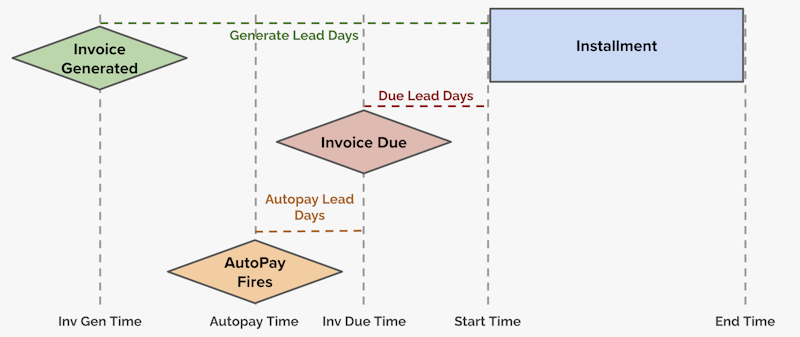
Adding a value for autopayLeadDays to an InstallmentPlanRef configuration tells the platform how many days before an invoice's dueTime the Autopay Plugin should be executed. The value must be greater than 0, and can be specified as a decimal value for more precise timing. The default value is 1.
An autopayTime will be calculated for your target invoices based on the autopayLeadDays value and the invoice dueTime. If an invoice has more than one installment, the invoice autopayTime will be the earliest autopayTime of its installments.
Here's an example of an InstallmentPlanRef configuration called Quarterly:
{
	"displayName": "Quarterly",
	"cadence": "quarterly",
	"anchorMode": "termStartDay",
	"generateLeadDays": 14,
	"dueLeadDays": 0,
	"maxInstallmentsPerTerm": 1000,
	"autopayLeadDays": 2
}
Make sure to update your installment settings to use your InstallmentPlanRef configuration.
For example, you could specify a defaultInstallmentPlan in the product configuration:
{
	"defaultInstallmentPlan": "Quarterly"
}
Implementation
Create a new Java class in the src/main/java/com/socotra/deployment/customer folder. All plugin code must be contained within this folder. We named our class AutopayPluginImpl.java in the example below, but you can name your class whatever you'd like.
Implement the AutopayPlugin interface and override the autopay method.
For example, this implementation pays the total remaining amount on an invoice:
public class AutopayPluginImpl implements AutopayPlugin {
    private static final Logger log = LoggerFactory.getLogger(AutopayPluginImpl.class);

    // Pay the total remaining amount on an invoice

    @Override
    public AutopayPluginResponse autopay(AutopayRequest autopayRequest) {
        Invoice invoice = autopayRequest.invoice();

        log.info("Received autopay request for invoice: {}", invoice.locator());

        return AutopayPluginResponse.builder()
                .paymentRequest(
                        PaymentCreateRequest.builder()
                                .type("StandardPayment")
                                .amount(invoice.totalRemainingAmount().orElseThrow())
                                .currency(invoice.currency())
                                .paymentState(PaymentState.requested)
                                .targets(
                                        List.of(
                                                CreditItem.builder()
                                                        .containerLocator(invoice.locator())
                                                        .containerType(CreditContainerType.invoice)
                                                        .build()))
                                .data(
                                        Map.of(
                                                "note",
                                                "from AutopayPlugin",
                                                "payerFirstName",
                                                "John",
                                                "payerLastName",
                                                "Doe"))
                                .build())
                .nextRequestTime(Instant.now())
                .build();
    }
}
The method request object contains the invoice.
The method returns an AutoPayPluginResponse with paymentRequest and nextRequestTime properties.
The PaymentCreateRequest object contains the following fields:
type- Refers to a PaymentRef configurationamount- The payment amountcurrency- The payment currencypaymentState- The state of the payment that will be created by the pluginfinancialInstrumentLocator- The locator of the financial instrument that will be used to make the paymenttargets- One or more invoices that will be paidretryPlanName- The name of the payment execution retry plandata- Extension data that will be associated with the payment
The nextRequestTime can be used to delay the execution of the Payment Execution Service after the Autopay Plugin is executed. In the example above, the Payment Execution Service will be executed immediately after the plugin is executed. If no value is provided for nextRequestTime, the Payment Execution Service will be executed immediately after the plugin is executed.
Execution
The system will execute the Autopay Plugin when the autopayTime is reached for an invoice.
The following diagram illustrates autopay timing:
For payments created in the requested state, the Payment Execution Service will be executed after the plugin is executed.
Accounts must specify a default financial instrument before the Payment Execution Service can process payments. To specify a default instrument, first call the Create a Financial Instrument API endpoint, then call the Set the Default Financial Instrument for a Tenant API endpoint, using the financial instrument locator returned from the first request as the locator for the second request.
Here's an example request for the Create a Financial Instrument API endpoint:
{
	"externalIdentifier": "ExampleIdentifier",
	"institutionName": "ExampleInstitution",
	"instrumentType": "checking",
	"defaultTransactionMethod": "ach",
	"externalAccountNumber": "abc12345",
	"accountLocator": "01K0FDV1SRW6N6T407JQ7XSAE1",
	"nickname": "ExampleNickname"
}
After the Payment Execution Service is executed, the Payment Post-Processing Plugin will be executed.
Once a payment moves to the posted state, corresponding invoices will move to the settled state as long as the invoices have been paid in full. Otherwise, invoices will remain in the open state.
Payment States
The Autopay Plugin can be used to create a payment in a specific state. Payment processing behavior differs based on the state of the payment created by the plugin:
requested- The Payment Execution Service will immediately attempt to process the payment through a payment provider such as Stripe or Braintree. Once the payment has been successfully processed, it will move to thepostedstate.posted- The Payment Execution Service will not attempt to process the payment. Creating a payment this way assumes that the Autopay Plugin code has successfully processed the payment by calling an external API via the Java HttpClient .draft- The Payment Execution Service will not attempt to process the payment. The Payments API can be used to manually move the payment to a different state.
Payments can be created in other states in addition to the states listed above. Refer to the paymentState field in the PaymentResponse object for a complete list of payment states.
Disabling Autopay
The Autopay Plugin can be disabled for an invoice by calling the Update Invoice API endpoint and setting suppressAutopay to true.
Here's an example request:
{
	"suppressAutopay": true
}
Updating Autopay Time
The autopayTime can be manually updated for an invoice by calling the Update Invoice API endpoint and specifying an autopayTime.
Here's an example request:
{
	"autopayTime": "2025-07-10T05:00:00Z"
}
The autopayTime can be set to any time before the invoice dueTime. If the autopayTime is set to a time in the past, the Autopay Plugin will be executed immediately.
If the Update Invoice API endpoint is used to trigger the Autopay Plugin, and the target invoice is already in the settled state, the endpoint will return a 400 error.
Events
The Autopay Plugin can generate the following events:
billing.invoice.autopay- The Autopay Plugin executed successfullybilling.invoice.autopayfailed- The Autopay Plugin failedbilling.payment.request- Payment transitioned to therequestedstatebilling.payment.execute- Payment transitioned to theexecutingstatebilling.payment.cancel- Payment transitioned to thecancelledstatebilling.payment.fail- Payment transitioned to thefailedstatebilling.payment.validationfailed- Payment failed to transition from thedraftstate to thevalidatedstate
Example
The following example is based on the Prism configuration. Contact your Socotra representative for more information.
// Pay the total remaining amount on an invoice if the invoice fee amount is close to 10

@Override
public AutopayPluginResponse autopay(AutopayRequest autopayRequest) {
    Invoice invoice = autopayRequest.invoice();

    log.info("Received autopay request for invoice: {}", invoice.locator());

    Optional<ULID> policyLocator = invoice.invoiceItems().iterator().next().policyLocator();

    if (policyLocator.isPresent()) {
        Policy policy = DataFetcher.getInstance().getPolicy(policyLocator.get());

        if (invoice.totalRemainingAmount().isPresent()
                && policy.invoiceFeeAmount().isPresent()
                && policy
                .invoiceFeeAmount()
                .get()
                .subtract(BigDecimal.TEN)
                .abs()
                .compareTo(new BigDecimal("0.01"))
                <= 0) {
            return AutopayPluginResponse.builder()
                    .paymentRequest(
                            PaymentCreateRequest.builder()
                                    .type("StandardPayment")
                                    .amount(invoice.totalRemainingAmount().orElseThrow())
                                    .currency(invoice.currency())
                                    .paymentState(PaymentState.requested)
                                    .targets(
                                            List.of(
                                                    CreditItem.builder()
                                                            .containerLocator(invoice.locator())
                                                            .containerType(CreditContainerType.invoice)
                                                            .build()))
                                    .data(
                                            Map.of(
                                                    "note",
                                                    "from AutopayPlugin",
                                                    "payerFirstName",
                                                    "John",
                                                    "payerLastName",
                                                    "Doe"))
                                    .build())
                    .nextRequestTime(Instant.now())
                    .build();

        } else {
            return AutopayPluginResponse.builder().build();
        }
    } else {
        return AutopayPluginResponse.builder().build();
    }
}