
Reporting Overview
Socotra makes your data available via the Data Lake, a relational view of your operational data at its most granular level to support any analytical needs. It can be queried directly via SQL for quick insights, or easily replicated into your data infrastructure to support custom transformations.
High-level business insights are also available for fast consumption via Metrics.
Operational data updates are reflected in the below reporting offerings often in minutes and typically within two hours. For real-time data needs, consider an API-based approach.
Overview
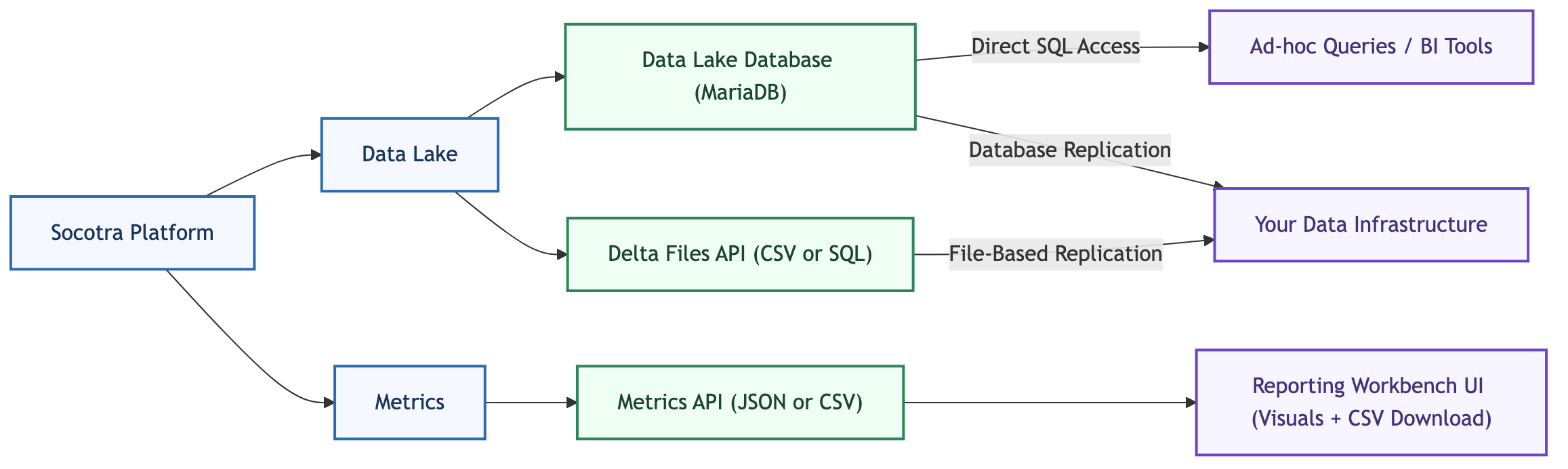
Socotra offers the following reporting solutions:
- Data Lake Database — a hosted MariaDB SQL database you can query directly with any SQL client or connect to BI/ELT tools via provided ODBC/JDBC credentials.
- Data Lake Delta Files — incremental diff files, retrieved via API in
csvorsqlformat, purpose-built for replicating Data Lake data into your own infrastructure. - Metrics — a set of pre-aggregated, high-level business metrics, such as Gross Written Premium, accessible via the UI or API with
csvexport.
Both Data Lake Database and Delta Files require enablement; Metrics are enabled by default.
Data Lake Database and Delta Files both expose the exact same underlying data model — they're two different ways of getting at the same data, not two different data models.
Data Lake
The Data Lake is a flexible, product-agnostic relational data model that Socotra maintains on your behalf, automatically reflecting your operational data according to your product configuration — no customization required.
Deploy a configuration, start generating data, and the corresponding tables and rows populate automatically. As your product definition evolves with new fields, entity types, and plans, the resulting data simply flows through — ready for you to transform and analyze however your business demands.
For a deeper look at the data model, entity relationships, and how data extensions work, see the Data Lake Data Model guide. For a detailed listing of all tables and fields, see the Data Lake Table Reference.
There are two ways to access your Data Lake data, depending on where you are in your implementation and what your reporting needs look like:
- Direct SQL Access - connect to the Data Lake Database directly to execute SQL queries, no pipeline required.
- Data Replication to Your Data Infrastructure - replicate your Data Lake data into your destination of choice, such as Databricks or Snowflake, via file-based or database replication.
Direct SQL Access
Query data directly, no pipeline required. Great for ad-hoc queries, reports, and BI tool visualizations. This is a read-only connection — no custom views or transformations on Socotra's side — and all ODBC/JDBC credential provisioning is managed within the Socotra system upon request.
Complex transformations run directly against the Data Lake Database aren't guaranteed to scale or perform well as data volume grows over time. Consider replicating data into your own data infrastructure as your data volume grows.
Data Replication to Your Data Infrastructure
As your reporting needs grow, replicating your data to your own data infrastructure gives you room to build and maintain your own transformations, analytics, and governance, and to combine your Socotra data with other sources.
To replicate your Data Lake data into your own cloud storage location, data warehouse/lake, or other destination of choice, consider the two options: file-based replication or database replication.
File-Based Replication
Delta files are incremental diff files that are generated directly by the system in both csv and sql format and made available via API. They contain only the rows that changed, making them the most efficient path for replication. They are independent of the Data Lake Database instance entirely.
See the Data Lake Delta Files replication guide for more information.
Database Replication
Replicate directly from the Data Lake Database using a data integration (ELT) tool of your choice, such as Fivetran. This can be a good fit if you already have ELT tooling and pipelines in place, since it lets you point that existing setup at the Data Lake Database rather than adopting a new replication mechanism.
The Data Lake Database doesn't expose binary logs (binlogs), so change detection generally relies on scanning or timestamp polling rather than binlog-based CDC. If you're using Fivetran, use its Teleport Sync method, which detects changes via a checksum-based approach rather than its standard binlog-based CDC.
See the Data Lake Database guide for more on replicating via the database.
Metrics
Metrics give you fast access to high-level business insights — such as gross written premium, issued policy counts, and renewal rates — without any enablement or preconfiguration required.
Pull metrics in csv or json format programmatically via API, or use the Reporting Workbench UI to visualize them and export results as csv.
See the Metrics guide for the full list of available metrics and API details.
Related Offerings
For real-time or custom needs beyond Data Lake and Metrics, Socotra also provides:
- APIs — Pull any entity in real time and transform it into your own data model. Since Data Lake already provides this in relational form, APIs generally aren't the recommended path for reporting, but they're a good fit for truly real-time needs. See the API Reference section for details.
- Events — A full event stream you can consume as another building block for event-driven or custom reporting pipelines. See the Events guide for details.
- Search — Request lists of entities matching specific criteria in real time via API. See the Search guide for details.