
Autopay
Overview
The Autopay feature enables insureds to set up a payment method and have regular payments executed automatically, so they don't have to worry about mailing a physical check or going online before the due date and possibly incurring late fees or policy lapses. This also leads to more predictability for payments and fewer mismatches between payments and amounts due.
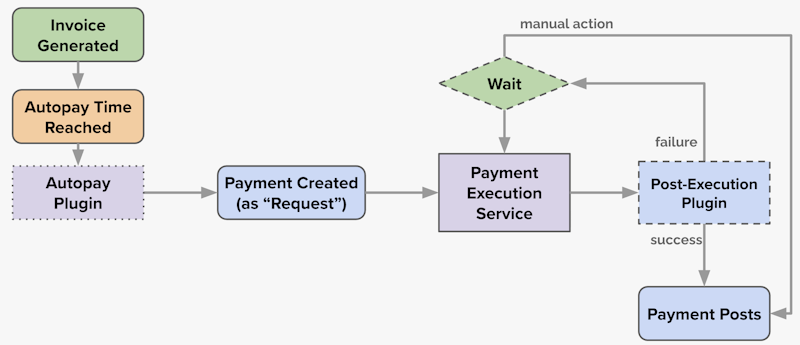
The typical autopay process looks like this:
- Add an
autopayLeadDayssetting to your installment plans. This specifies the number of days before invoices become due that the autopay process will start. - Installments and invoices will have their
autopayTimevalue set using the lead days. - When the
autopayTimeis reached for an invoice, the system will execute the Autopay Plugin. - The plugin may be implemented to create a Payment in
requestedstate. - The Payment Execution Service will attempt to execute the actual transaction with an external financial institution.
- If successful, the payment will advance to
postedstate and settle the invoice; otherwise retries may be attempted.
Installments and Invoices
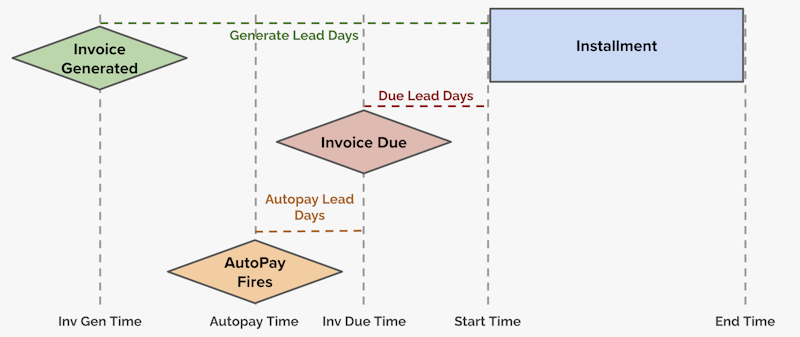
When installments are generated, the autopayTime will be set using the autopayLeadDays property on the installment plan. This time will be used to set the autopayTime on the invoice when it is generated.
If more than one installment is added to an invoice, the invoice's autopay time will be the earliest autopay time of its installments.
The autopay timing looks like this:
To suppress autopay for an invoice, you can set its suppressAutopay property to true using the Update Invoice endpoint.
Autopay Plugin
When the autopayTime is reached for an invoice, the system will execute the Autopay Plugin. See the Autopay Plugin feature guide for more information.
Payment Requests
After a payment is created in requested state the payment execution service will take over. The overall flow looks like this: