

Flat Charges
Overview
Normal charges in Socotra are rate-based, proratable, and controlled by the policy system. For example, a typical "premium" charge can be expressed as a rate such as "$1000 per month", and is linked to an element with a duration, such as a year-long coverage. Consider a typical RatingItem construction in this rating plugin code excerpt:
var ratingItem = RatingItem.builder()
    .elementLocator(vehicle.locator())
    .chargeType(ChargeType.Premium)
    .rate(BigDecimal.valueOf(rate))
    .build();
Here, the rating item is tied to a "vehicle" element -- in this case, an exposure -- with the amount given as a rate per unit of time. The unit of time is determined by the durationBasis (see "Durations"), with the length of time determined by the duration of the segment to which the element belongs. Charges are then sent to the billing system for distribution across the invoice stream.
Socotra features "flat charges" to assess charges lacking such an inherent sense of duration. Flat charges are especially useful for various kinds of fees. They can be created through the billing system, placed on an upcoming invoice or on an immediate separate invoice, and reversed, all in isolation from the policy system.
Configuration
Flat charges are declared like other charges in ConfigurationRef, but are distinguished from "normal" charges with the handling property set to flat. This is the current charge definition specification:
Required properties
| Property | Type | Description |
|---|---|---|
category | Enum none | premium | tax | fee | credit | invoiceFee | cededPremium | nonFinancial | surcharge | |
handling | Enum flat | normal | retention | |
invoicing | Enum scheduled | next | immediate | |
transactionBundlingEnabled | boolean |
Optional properties
| Property | Type | Description |
|---|---|---|
displayName | string?Deprecated |
Unless otherwise specified, charges have a default handling of normal and invoicing of scheduled. Flat fees are configured with handling: flat and should be specified with invoicing values next (the default), immediate, or scheduled. Here's a tabular depiction of the handling and invoicing combinations:
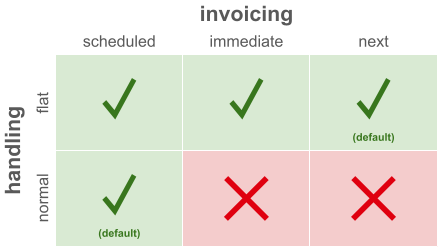
The system will return an error if you attempt to deploy normal charges with invoicing: immediate or invoicing: next.
Flat charges with invoicing: next can be configured with transactionBundlingEnabled: true to enable transaction charge bundling during invoicing. This property will be set to false for all charges by default.
A configuration with normal and flat charges might look like this:
"charges": {
    "Premium": {
        "category": "premium"
    },
    "ServiceFee": {
        "category": "fee",
        "handling": "flat",
        "invoicing": "immediate"
    },
    "AdminFee": {
        "category": "fee",
        "handling": "flat",
        "invoicing": "next",
        "transactionBundlingEnabled": true
    }
}
Usage
Flat charges can be created as part of the rating plugin response during transaction pricing, or created directly via the Flat Charges API.
Flat Charges via Rating
When you create flat charges through the rating plugin, you set the amount on the RatingItem instead of the rate. If you supply rate or referenceRate, these will be persisted for reference, but have no functional impact. Here's an example of a flat charge RatingItem being created in a rating method:
var feeRatingItem = RatingItem.builder()
                        .elementLocator(quote.locator())
                        .chargeType(ChargeType.flatFeeNext)
                        .amount(new BigDecimal("2.00"))
                        .build();
When a transaction is reversed and reapplied, or a post-split segment is created, any flat charges will be stripped out of the new transaction. The original flat charge stands.
If a transaction is invalidated or refused, or is explicitly reversed through the issuance of a reversal transaction, the billing system will reverse the transaction's flat charges.
Flat charges are not affected by cancellation transactions, but can be offset if needed through the creation of new charges.
Flat Charges via API
The Flat Charges API can be used to manipulate and view charges, allowing for the creation and invoicing of flat charges independently of the policy system rating process. To inject flat charges into billing, use the Add Charges endpoint.
Flat charges created by API must have immediate or next invoicing.
If the flat charge has invoicing: scheduled defined within configuration, it will be created with next when issued through the API. Any attempt to explicitly set invoicing: scheduled within the API request will fail.
Invoicing Behavior
If there are no applicable uninvoiced installments for a flat charge with next invoicing, then the charge will be billed as immediate.
When determining applicable installments for next invoicing, only installments matching the flat charge's currency are considered as candidates for assignment.
The following logic is applied to determine which uninvoiced installments are applicable:
- If transaction charge bundling is enabled and the charge is associated with an issued transaction, only installments originating from the bundled transaction are considered
- Else, if the charge has a
policyLocatorset, only installments associated with the policy are considered - Else, only installments associated with the account are considered
For immediate billing, a single new invoice will be created with the following:
- All flat charges created by the policy transaction or manual action; and
- Any other flat charges with matching currency that are pending with
nextinvoicing.
Every flat charge has a one-to-one association with an invoice item on its invoice unless it has invoicing: scheduled, in which case it can be spread across installments.
The billing of flat charges created as part of a policy transaction is not affected by the transaction's effective time when transaction charge bundling is disabled.
The platform uses relevant installment preferences to determine due dates for immediately invoiced flat charges.
Generated early invoices will include all flat charges scheduled for the next invoice when invoiceThroughTime is used.
The Reverse Charges API endpoint creates reversal charges that are invoiced the same way as regular flat charges. They cannot be reversed. When a reversal charge is created, all tags associated with the original charge will be copied and associated with the reversal charge.
Flat charges that are billed immediate and therefore are on their own invoice will not trigger the autopay process. These invoices will need to be handled separately. New payment requests can be created for these which can be handled by the payment execution service.
Transaction Charge Bundling
By default, flat charges with next invoicing are included on invoices regardless of which transactions the installments originate from. Transaction charge bundling provides the ability to configure charges so they are included only on invoices that bill installments originating from a specific transaction.
Charge bundling is enabled as part of charge type configuration via the ChargeRef transactionBundlingEnabled attribute. When enabled, charges are bundled with applicable uninvoiced installments originating from the associated transaction. If there are no remaining uninvoiced installments for the transaction, charges are invoiced according to default next invoicing behavior, as if bundling were disabled.
Bundling applies during scheduled invoice generation and invoice previews.
For flat charges generated via API with a charge type that has bundling enabled, the transaction to bundle to is specified by the transactionLocator provided in the request. If transactionLocator is not specified or the provided transaction is in a non-issued state, the charge cannot be bundled and will follow default next invoicing behavior.
Flat charges generated by the Rating Plugin are already associated with the transaction that resulted in plugin execution and charge generation, and will be bundled with the associated transaction when bundling is enabled for the charge type.
Delinquency
If invoices containing only flat charges become past due, and any of the charges reference a policyLocator, the corresponding policy (or policies) will enter delinquency.