Retention Charges
Overview
Retention charges are additional charges applied during a cancellation transaction to adjust the final amount retained for a policy. These charges may be positive to increase the amount retained or negative to decrease the amount retained.
Common use cases include:
Minimum Earned Premiums - ensuring a minimum amount is retained to cover policy issuance costs
Short-Rate Penalties - retaining additional amounts as a penalty for early cancellation by the insured
Custom Fee or Refund Requirements - implementing other conditional fees or refunds based on custom business rules
Retention charges are fixed-amount, non-proratable charges that are not derived from rate-based calculations, making them conceptually similar to Flat Charges.
Retention charges are automatically created by the Cancellation Plugin during cancellation transaction pricing.
Configuration
Retention charges are declared like other charges in ConfigurationRef, but are distinguished by having their handling property set to retention.
This is the current charge definition specification:
requiredcategory Enum cededPremium | credit | fee | invoiceFee | none | nonFinancial | premium | surcharge | taxhandling Enum flat | normal | retentioninvoicing Enum immediate | next | scheduledtransactionBundlingEnabled booleanoptionaldisplayName string? (deprecated)
Retention charges are configured with handling: retention and should be specified with invoicing: next. See this guide for more information on configuring normal or flat charges.
Here’s a tabular depiction of the handling and invoicing combinations:
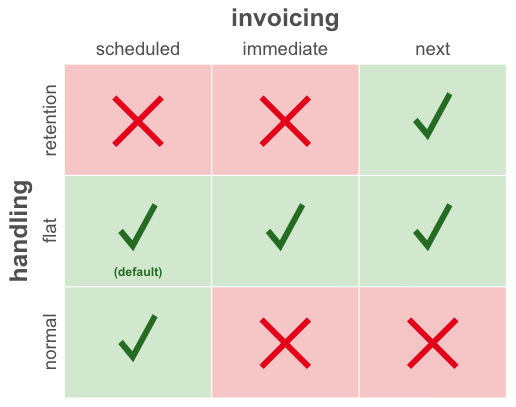
The system will return an error if you attempt to deploy retention charges with invoicing: scheduled or invoicing: immediate.
Retention charges can be configured with transactionBundlingEnabled: true to enable transaction charge bundling during invoicing. This property will be set to false for all charges by default.
A configuration with normal and retention charges might look like this:
"charges": {
    "Premium": {
        "category": "premium",
        "handling": "normal",
        "invoicing": "scheduled"
    },
    "MinimumPremium": {
        "category": "premium",
        "handling": "retention",
        "invoicing": "next"
    },
    "ShortRate": {
        "category": "fee",
        "handling": "retention",
        "invoicing": "next",
        "transactionBundlingEnabled": true
    }
}
Like normal or flat charges, any element that will be associated with a retention charge must declare that charge type in its charges list within configuration.
For example, a configuration allowing normal and retention charges to be associated with a CommercialAuto element would look like this:
"elements": {
    "CommercialAuto": {
        "charges": [ "Premium", "MinimumPremium" ]
    }
}
This ensures that retention charges created during cancellation can be associated correctly with the configured element.
Usage
Retention charges are created automatically by the Cancellation Plugin during cancellation transaction pricing.
The plugin evaluates the system-generated prospective cancellation charges and can output additional retention charges that represent increases or decreases in the amount retained.
Retention Charges via Cancellation Plugin
When you create retention charges through the cancellation plugin, you set the amount on the RatingItem instead of the rate. If you supply rate or referenceRate, these will be persisted for reference, but have no functional impact. Here’s an example of a retention charge RatingItem being created in a cancellation method:
var minPremiumRatingItem = RatingItem.builder()
                        .elementLocator(policy.locator())
                        .chargeType(ChargeType.MinimumPremium)
                        .amount(new BigDecimal("25.00"))
                        .build();
Retention charges are fully reversed by the policy system when a reinstatement transaction is issued, regardless of whether or not there is a gap between the cancellation and reinstatement. This will result in reversal charges being generated as part of the reinstatement charges that cancel out the retention charges.
When a cancellation transaction is explicitly reversed through the issuance of a reversal transaction, the billing system will reverse the transaction’s retention charges.
Invoicing Behavior
Retention charges are billed according to invoicing: next behavior, meaning they will be included on the next invoice containing applicable uninvoiced installments.
If there are no applicable uninvoiced installments for a retention charge, then the charge will be billed as immediate.
When determining applicable installments for next invoicing, only installments matching the retention charge’s currency are considered as candidates for assignment.
The following logic is applied to determine which uninvoiced installments are applicable:
If transaction charge bundling is enabled, only installments originating from the bundled cancellation or reinstatement transaction are considered
Else, if the charge has a
policyLocatorset, only installments associated with the policy are consideredElse, only installments associated with the account are considered
For immediate billing, a single new invoice will be created which will include all retention charges created as part of the cancellation or reinstatement transaction pricing.
Generated early invoices will include all retention charges scheduled for the next invoice when invoiceThroughTime is used.
Note
Retention charges that are billed immediate and therefore are on their own invoice will not trigger the autopay process. These invoices will need to be handled separately. New payment requests can be created for these which can be handled by the payment execution service.
Transaction Charge Bundling
By default, flat and retention charges with next invoicing are included on invoices regardless of which transactions the installments originate from. Transaction charge bundling provides the ability to configure charges so they are included only on invoices that bill installments originating from the associated transaction.
Charge bundling is enabled as part of charge type configuration via the ChargeRef transactionBundlingEnabled attribute. When enabled, retention charges are bundled with applicable uninvoiced installments originating from the cancellation or reinstatement transaction that resulted in their creation. If there are no remaining uninvoiced installments for the cancellation or reinstatement transaction, charges are invoiced according to default next invoicing behavior, as if bundling were disabled.
Bundling applies during scheduled invoice generation and invoice previews.
Retention charges generated by the Cancellation Plugin with bundling enabled will be bundled with the cancellation transaction that triggered Cancellation Plugin execution and charge generation. Similarly, reversed retention charges generated during reinstatement with bundling enabled will be bundled with the reinstatement transaction that triggered Rating Plugin execution and charge generation.
Delinquency
If invoices containing only retention charges become past due, the corresponding policy will enter delinquency.