Quote Groups
Quote groups can be used to categorize quote variants that represent a single prospective contract or marketing opportunity.
Quote groups allow you to:
Manage multiple quote alternatives for the same opportunity
Ensure that only one of those quotes can reach a certain state, such as
acceptedUnderstand the journey from alternatives to the bound option
Quote groups are established after intake and before binding: once you know enough about the risk to start producing real offers, a quote group can serve as the container for those offers, helping to enforce consistency and prevent redundant policy issuance.
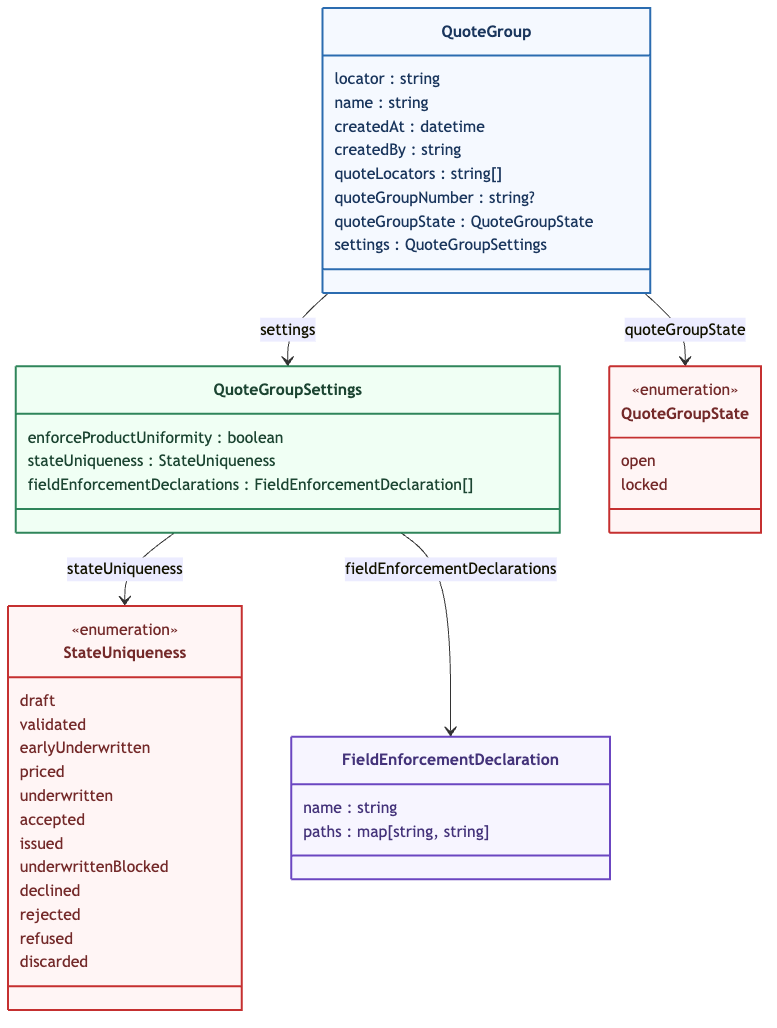
Quote groups have the following structure (see QuoteGroupResponse):
Usage
You can create a new quote group with the Create Quote Group API endpoint, specifying a name and settings. In settings, you must provide a stateUniqueness quote state value that tells the platform that only one quote in the group may be in the specified state at any given time. For example, if you set stateUniqueness to priced, you could have many quotes in the group in the draft or validated state, but only one in the priced state (and thereafter), which also causes the quote group to be locked, preventing quotes from joining or leaving the quote group. In this way, quote groups prevent duplicate business from advancing beyond a specified stage of the quote lifecycle, and also help to ensure that once a quote enters the specified state, you retain a view of which quotes have been considered as part of the production process.
In settings, you can also specify a value for enforceProductUniformity. This property tells the platform whether the group can have quotes with different products (false) or only one product (true). The fieldEnforcementDeclarations array can contain an array of objects of the form { name: string, paths: map<string, string> }, where the paths map keys are product names and the values are field path declarations. The name is a custom value you provide. For example, you could have a fieldEnforcementDeclarations array like this:
[
  {
    "name": "specialCode",
    "paths": {
      "PersonalAuto": "data.specialCode",
      "CommercialAuto": "data.customCode"
    }
  }
]
In this case, where the quote group accommodates quotes with different products (enforceProductUniformity: false), the platform will enforce value equality for “producer code”, which for PersonalAuto is indicated by the field located at data.specialCode (a product-level data extension) and for CommercialAuto is the field located at data.customCode. Data extension paths can be given for fields deeply nested in the data model for your product, but can only involve singular items (meaning no array subscripting).
Aside from data extensions, field enforcement paths can also refer to the following:
Jurisdiction
Region
Producer Code
You can use the Validate Quote Group API endpoint to check the validity of your quote group’s enforcement rules against your product configuration.
Updating Quote Groups
You may add quotes and remove quotes from a quote group as long as it is in the open (not locked) state. The Update Quote Group API endpoint lets you commit constituency updates and change the name or quoteGroupNumber in a single request. Note, however, that only the name of the quote group can be changed when it is in the locked state.
The settings on a quote group cannot be modified after quote group creation. If you need to update the settings in order to change the enforcement field declarations, product uniformity rule, or state uniqueness, create a new group with those settings and place your quotes in the new group.
You may move quotes from one quote group to another, assuming that the quote groups involved are not locked and the quote does not violate the target quote group’s settings. A quote can only belong to a single quote group. Adding a quote to a quote group will cause it to be removed from whatever quote group it is already in. Adding a quote to a quote group will fail if the original quote group is locked.
Note
Quotes in the draft state can still be updated, even if they belong to a locked quote group.
Associated Entities
You can create diary entries referring to quote groups, and can also reference quote groups in other work management features, such as tasks and user associations.
Preferred Quotes
A maximum of one quote locator can be marked as a preferredQuoteLocator within each quote group, which can be used to indicate that the specified quote is the most likely quote to be issued.
The preferredQuoteLocator can be set when creating a quote group or updating a quote group. The preferredQuoteLocator must refer to a quote within the specified quote group. The preferredQuoteLocator can be set to null by setting resetPrefferedQuote to true. If resetPrefferedQuote is set to true and a non-null value is provided for preferredQuoteLocator, the request will fail.
If a quote reaches the state specified in the stateUniqueness field, that quote locator will become the preferredQuoteLocator, and attempts to mark a different quote locator as the preferredQuoteLocator will fail. This quote locator will remain marked as the preferredQuoteLocator if the quote moves to a different state, until a different quote reaches the state specified in the stateUniqueness field.